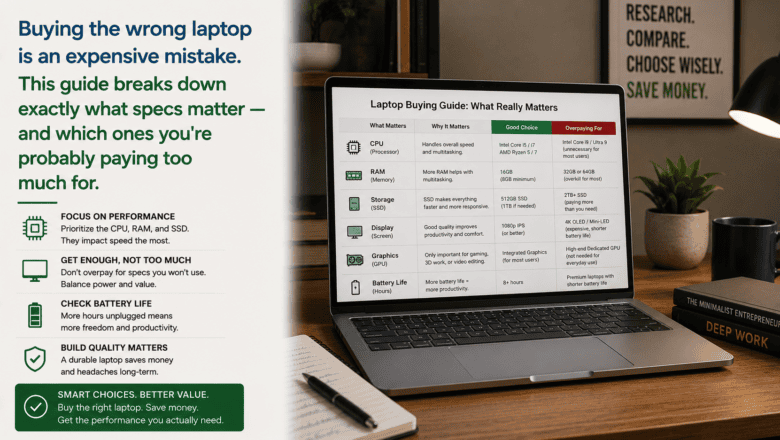
Buying the wrong laptop is an expensive mistake. This guide breaks down exactly what specs matter — and which ones you’re probably paying too much for.
STEP 1 — Define Your Primary Use Cases
Before looking at any specs, write down exactly what you will use the laptop for. General web browsing, email, and documents — any modern laptop handles these well. Video editing, gaming, or 3D rendering require significantly more processing power and GPU capability.
STEP 2 — Set a Realistic Budget
Excellent laptops exist at every price point above $400. The $600-900 range offers the best value for most users — you get solid build quality, a good display, and performance that lasts 4-6 years. Premium laptops above $1,200 offer better displays and lighter chassis but with diminishing returns.
STEP 3 — Choose Your Operating System
Windows runs the widest range of software and offers the most hardware variety at all price points. macOS on Apple Silicon MacBooks offers exceptional battery life and performance for creative work but is more expensive. Chrome OS on Chromebooks is simple, secure, and affordable but limited to web-based applications.
STEP 4 — Focus on These Four Key Specs
Processor: Intel Core i5 or AMD Ryzen 5 handles most tasks, i7 or Ryzen 7 for demanding work. RAM: 16GB is the current sweet spot — 8GB is workable but limiting. Storage: 512GB SSD minimum for most users. Display: at least 1080p resolution and 300 nits brightness for comfortable indoor use.
STEP 5 — Prioritize Battery Life and Build Quality
If you work away from outlets, battery life matters more than raw processing power. Look for laptops rated at 10-plus hours in real-world reviews — manufacturers’ numbers are always optimistic. Anything under 15 inches and 4 pounds is reasonably portable for daily carry.
STEP 6 — Read Professional Reviews Before Buying
Read independent reviews on rtings.com, Notebookcheck, and The Wirecutter before purchasing. These sites measure actual performance, battery life, display quality, and build quality rather than repeating spec sheet marketing.
Pro Tip
Q: What is the best tip for someone learning to choose the Right Laptop for Your Needs?
A: Buy refurbished laptops directly from Apple, Dell, Lenovo, or HP’s certified refurbished stores. You get the same warranty as new, same return policy, and often save 20-40 percent off the new price for identical hardware.
SUPPLIES NEEDED
Budget range in mind
Knowledge of your primary use cases
Comparison sites like rtings.com and notebookcheck.net
Products from Amazon

This site contains affiliate links. As an Amazon Associate I earn from qualifying purchases.


